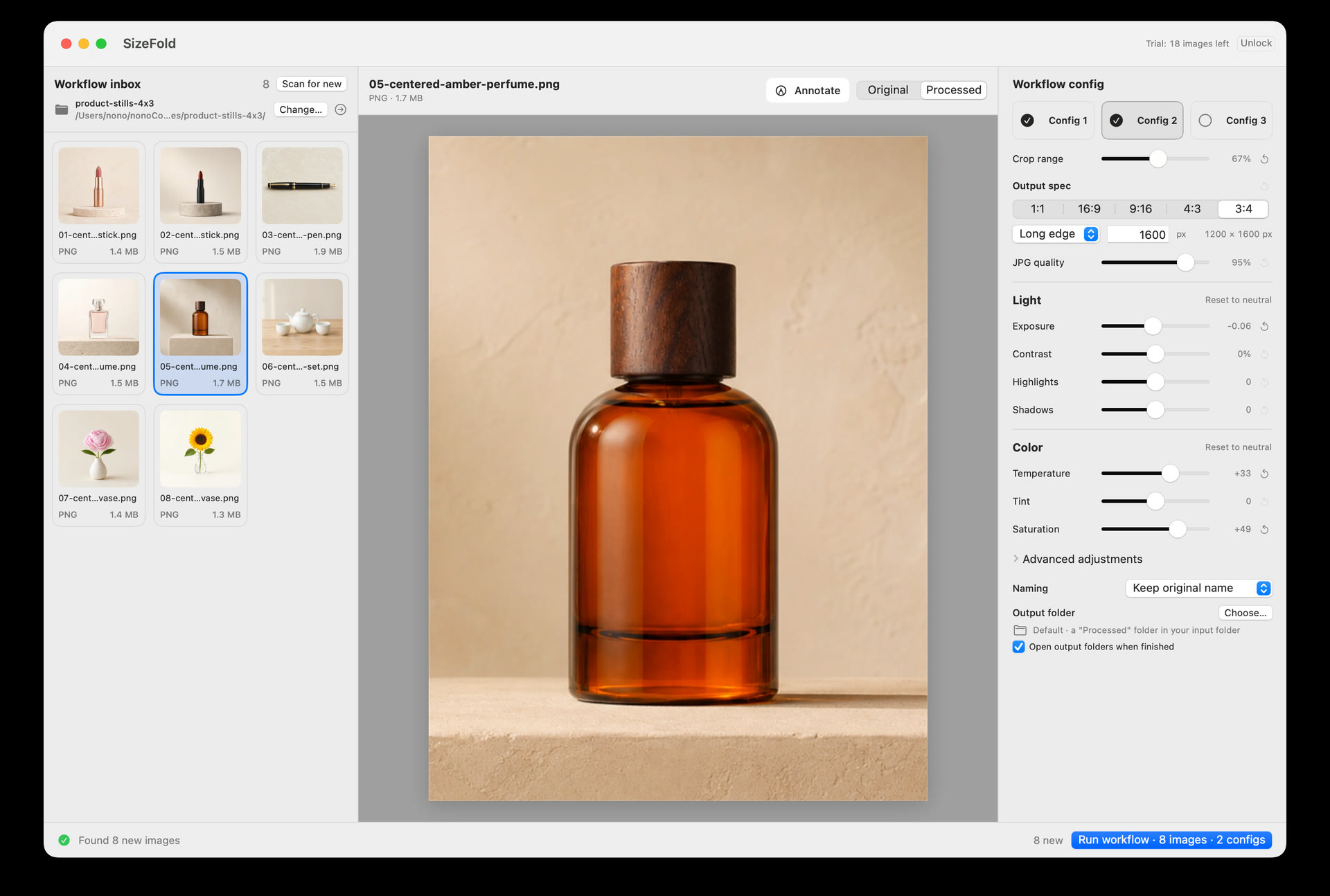
Release 1.7: Per-Config File Size Limits (Max KB) & Workflow Polish
The Problem: When you sell on Etsy, Shopify, or Amazon, platforms enforce strict file size thresholds. Etsy listings load sluggishly if image files exceed 1 MB, while mobile ad platforms frequently require photos under 500 KB. Traditionally, photographers had to drag an arbitrary JPEG quality slider (e.g. 85%), batch export, check file sizes in Finder, and find that dense product textures resulted in 1.4 MB files while plain backgrounds produced 300 KB. You were forced to re-export and guess quality percentages over and over.
Why We Built It: SizeFold 1.7 introduces an independent Max size limit (e.g. 500 KB) alongside traditional JPEG Quality percentage for each of your three output configurations. Keep your exact pixel dimensions intact—our encoder automatically performs binary search compression to find the highest possible visual quality that fits within your byte budget. The limit is calculated on final disk bytes, including embedded sRGB profiles and EXIF metadata.
Workflow Details & Polish:
- Arrow-Key Photo Browsing: Pressing arrow keys (↑ / ↓ / ← / →) directly navigates between previous and next images in the folder, while text inputs (model name, naming templates) remain safely isolated for caret movement.
- Product Model Restored on Undo: Undoing a batch immediately restores the product model text used for that batch, eliminating the risk of forgetting to re-enter SKU numbers.
- Immediate Naming Persistence: Changes to the workflow naming style are persisted to storage immediately without debounce delay, ensuring seamless continuity across restarts.
The Safety Invariant: If an image is so complex that even the minimum allowable quality cannot meet your strict byte target, SizeFold fails that specific output safely. The camera original remains in the Input folder with an explicit status message instead of silently generating blurry artifacts.
Release 1.6: Decoupling Preview Inspection from Batch Scope
The Problem: Imagine dropping 50 new SKU photos into your Input folder. Before hitting "Run", you click on photo #12 in the thumbnail strip to inspect focus on a product seam. In earlier releases, clicking that thumbnail focused the selection—so clicking "Run" processed *only that single photo* instead of all 50 photos in the folder.
Why We Built It: SizeFold 1.6 completely decouples preview inspection from batch execution. Clicking any thumbnail updates the center large viewer and allows instant hold-to-compare with original, but leaves the batch queue intact. Clicking "Run" always processes every pending image in the folder. A dedicated "Select" mode with explicit checkboxes is provided only when you intentionally want to run a temporary subset.
Release 1.5: Text Field Isolation, 10-Batch Undo, and Workflow-Wide Settings
The Problem: Real photoshoot workflows are fast-paced and prone to keyboard and state friction:
- Keyboard Hotkey Collision: When typing product SKU numbers like
LEATHER-BAG-01into the model field, pressing left or right arrow keys to fix a typo inadvertently triggered global image navigation and changed the photo being reviewed. - Accidental Batch Runs: If an accidental run occurred, recovering required manual Finder digging. For trial users, that accidental run wasted part of their 200-photo free trial allowance.
- Settings Fragmentation: Options like "Keep EXIF" and "Organize by model" were scattered across individual configs rather than unifying the delivery session.
Why We Built It:
- Strict Text Field Isolation: Arrow keys, Space, and Tab remain strictly scoped to text fields whenever an input is focused.
- 10-Batch Undo & Partial Refund: Revert any of the last 10 successful or partially successful batches in one click. SizeFold restores originals to the Input folder, cleans up generated files, and refunds the exact trial count used.
- Workflow-Wide Options: "Organize by model", "Keep EXIF", and "Open after processing" now apply across the entire run. "Organize by model" creates structured
Model/Configfolders consistently. - Thumbnail Range Selection: Normal click replaces selection, Command-click toggles, and Shift-click selects contiguous ranges.
- File Version Protection: Photos modified or removed after run preparation are safely preserved in Input rather than processing an unexpected version.
Release 1.4: Per-Photo Rotation and Individual Crop Center Overrides
The Problem: In studio tabletop shoots, cameras mounted on overhead overhead arms often transfer photos rotated 90° or 180° sideways. Furthermore, while most products share the same framing, an occasional item (like a tall vertical vase among short ceramic bowls) requires a different focal center.
Why We Built It:
- Single-Photo 90° Clockwise Rotation: Rotate individual overhead photos in the preview inspector. The rotation travels with that photo into previews and final batch outputs without altering other photos in the batch.
- Single-Photo Focal Center Override: Click "Choose…" while inspecting a photo to set an individual crop center that overrides the batch center for that photo only.
Release 1.2: Batch Undo, Custom Crop Ratios & Dynamic Filename Templates
The Problem: Traditional batch converters offer zero safety if you click export with an incorrect folder or setting. Furthermore, rigid built-in ratios (1:1, 4:3, 16:9) couldn't accommodate custom website banners (like 1.91:1 or 5:4), and filename rules couldn't include dates or output dimensions.
Why We Built It:
- Single-Click Batch Undo: The first implementation of SizeFold's signature Undo engine, restoring originals and deleting generated outputs if a batch needed to be recalled.
- Custom Aspect Ratios: Enter any custom ratio (such as
5:4or1.91:1) alongside standard presets. - Dynamic Filename Builder: Combine
{original},{model},{config},{date},{size}, and continuous##numbering. - Copy Processing Settings: Right-click any output config to copy crop and color settings from another config instantly.
- Color & Metadata Safety: Embedded sRGB ICC profiles in all JPEG outputs, with optional EXIF retention (stripping private GPS data).
Release 1.1: Continuous SKU Numbering, Crop-Only Mode & Live Folder Watching
The Problem: When shooting multiple SKU items sequentially, traditional tools either overwrite earlier files with the same name or reset numbering back to 001. Photographers also needed a way to crop without downsampling pixels, and had to manually re-scan folders when dropping in new photos.
Why We Built It:
- Model + Continuous Numbering: Type a model name once; SizeFold checks the destination folder and automatically continues from the next available number (e.g.
MUG-001-08.jpg) without overwriting existing files. - Crop Only vs. Crop & Resize: Choose "Crop only" to preserve the cropped region's original pixel dimensions, or "Crop & resize" to scale to target edge lengths.
- Interactive Visual Crop Center: Traditional batch tools default to using the dead center of the image. But when a shooting setup is slightly offset, the true subject center isn't dead center. SizeFold lets you click anywhere on the photo preview to choose the actual focal center for the entire batch, ensuring cropped outputs truly showcase the intended subject.
- 90° Processed Batch Rotation: Rotate the processed batch orientation without rotating the original source preview.
- Live Input Folder Watching: New incoming photos appear automatically in the pending list while SizeFold is open.
- "To Delete" Staging Folder: Move rejected, blurry, or test shots to a recoverable
To Deletefolder rather than permanently erasing them.
Release 1.0: Foundational Architecture & Folder-Based Queue
Photographers and e-commerce sellers do not want another subscription, another cloud database, or a proprietary photo library that locks up their files. Memory card readers, tethered cameras, and AirDrop transfers already deposit images directly into Mac Finder folders.
SizeFold was built around a strict architectural invariant: The Input folder is the queue, and originals are never touched until every enabled delivery is verified.
- Drop incoming photos into your designated
Inputfolder. - SizeFold reads the folder, previews crops, and generates up to 3 outputs simultaneously (e.g. 3:4 mobile tall, 1:1 square, 9:16 vertical reels).
- Only after every enabled output file is verified on disk does the original move to the
Originalsarchive folder. - If an output fails (due to disk space, corruption, or size constraints), the original stays safely in
Inputfor review. You never lose a commercial shoot.
Experience the Repeatable Workflow
SizeFold includes 200 fully processed photos for free, with all features unlocked. No subscription, no account required, and 100% native Mac processing.