Master Marketplace Cheat Sheet (2026 Specs)
Keep this table bookmarked for your next product shoot. It reflects the official recommendations and real-world conversion data for each marketplace:
| Platform & Placement | Recommended Ratio | Target Dimensions | Max File Size | Color Profile | Best Usage |
|---|---|---|---|---|---|
| Etsy Cover (Mobile Search) | 3:4 (or 2:3) | 2000 × 2667 px | < 1 MB (Max 20MB) | sRGB | Mobile app feed ranking (+40% screen area) |
| Etsy Listing Gallery | 1:1 (Square) | 2000 × 2000 px | < 1 MB | sRGB | Desktop listing gallery & zoom view |
| Shopify Product Page | 1:1 (Square) | 2048 × 2048 px | < 2 MB (Max 20MB) | sRGB | High-res zoom & consistent responsive collection grids |
| Amazon Main Image | 1:1 (Square) | 2000 × 2000 px (up to 3000px) | < 5 MB (Max 10MB) | sRGB | Pure white background (RGB 255,255,255), 85%+ product fill |
| Instagram Reels & TikTok | 9:16 (Vertical) | 1080 × 1920 px | < 4 MB | sRGB | Full-screen mobile video covers & Stories |
| Pinterest Pins | 2:3 (or 9:16) | 1000 × 1500 px | < 5 MB | sRGB | Feed pins & product rich pins |
| Website Hero Banners | 16:9 or 4:3 | 2400 × 1350 px | < 800 KB | sRGB | Desktop homepage collections & blog headers |
1. The Mobile Shift: Why 3:4 and 2:3 Are Winning on Etsy
For years, e-commerce playbooks recommended 1:1 square photos across the board. While squares remain essential for desktop catalogs and Shopify collection grids, over 70% of Etsy, Instagram, and TikTok browsing now happens on smartphones.
In a dual-column mobile search feed, a 3:4 tall image occupies 40% more vertical screen real estate than a 1:1 square. That extra height allows shoppers to see texture, scale, and craftsmanship without zooming in, resulting in measurable improvements in tap-through rates (CTR). However, your desktop store and Amazon storefront still strictly enforce 1:1 squares.
The Strategy: Never compromise one platform for another. Shoot your camera frames wide enough to support both, then use a batch workflow to crop a 3:4 version for Etsy and a 1:1 version for Shopify simultaneously.
2. Why Do Uploaded Photos Look Blurry or Washed Out?
E-commerce sellers frequently complain that photos look crisp in Lightroom or Apple Photos, but turn dull or blurry once published online. This is caused by three common technical mistakes:
Mistake 1: The Color Space Trap (Display P3 vs. sRGB)
Modern Mac screens, iPhones, and mirrorless cameras capture images in wide color gamuts like Display P3 or AdobeRGB. However, web browsers and mobile apps interpret un-profiled images as standard sRGB. If you upload a Display P3 JPEG without converting it to sRGB, vibrant leather tones and rich jewelry turn murky, pale, and washed out. Always ensure your exporter embeds the standard sRGB profile.
Mistake 2: The Aggressive CDN Compression Trap
Etsy and Shopify run aggressive compression algorithms to speed up page loads. If you upload an untouched 12 MB or 18 MB camera export, the platform's automated system crushes the image with severe compression, introducing ugly compression artifacts and soft edges. The secret is pre-compression: export your JPEGs at full resolution (e.g. 2000px or 2048px) but limit the final file size to around 500 KB to 1 MB. The platform recognizes the file is already optimized and preserves your sharp details untouched.
Mistake 3: The Rigid Center-Crop Problem (Off-Center Product Placement)
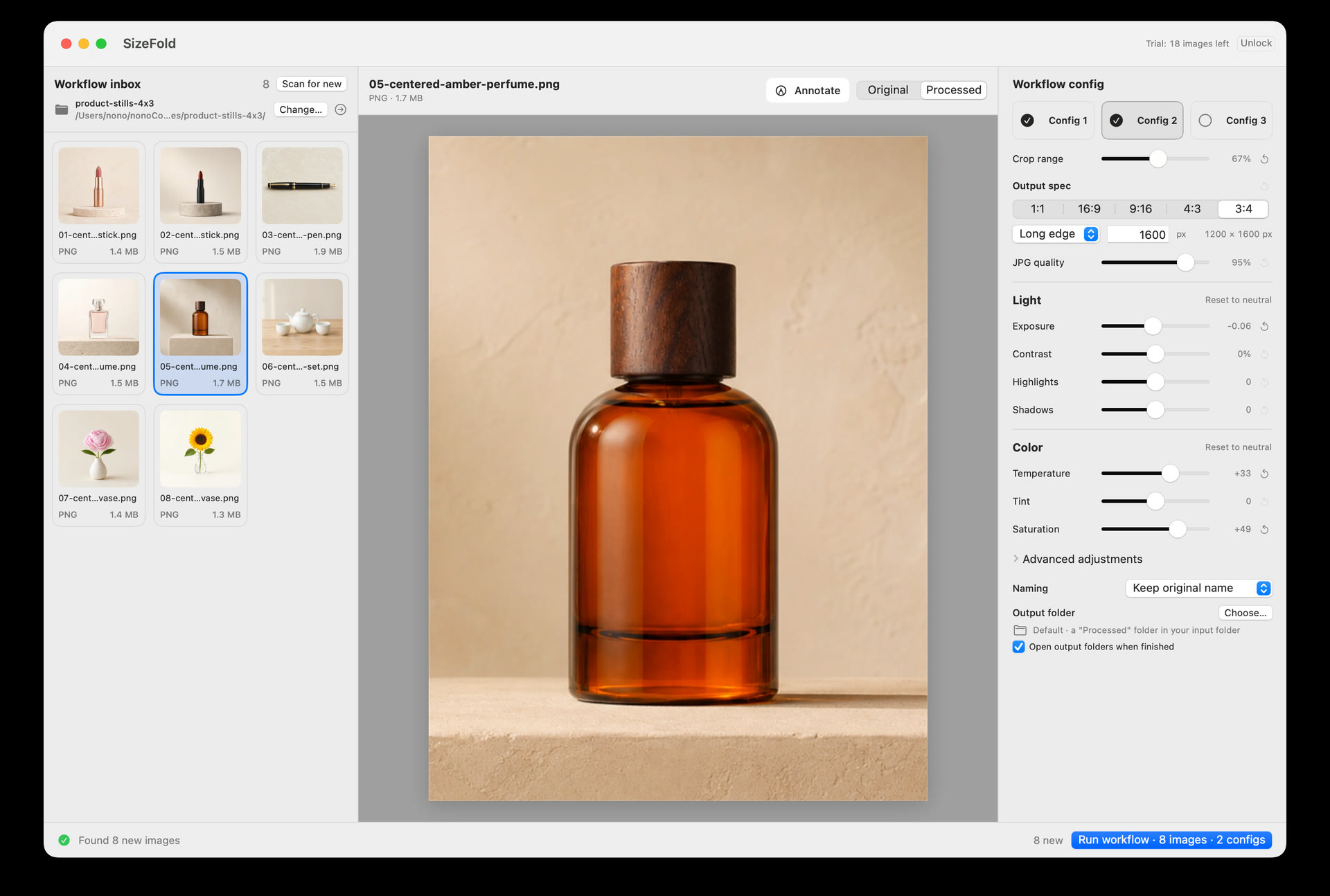
In standard photo tools, batch cropping automatically takes the dead geometric center of the frame as the crop center. But in real-world product shoots, camera angles or product positions are often slightly offset—the true subject center does not sit dead center. A rigid center-crop ends up slicing into the product or leaving awkward margins. SizeFold solves this naturally: click Choose… and click directly on your true subject center in the original preview. That point becomes the anchor for the crop, ensuring every cropped version (whether 1:1, 3:4, or 9:16) truly showcases the product you set out to shoot.
3. How to Automate All Deliveries in SizeFold
Instead of manually cropping for Etsy, then re-selecting the original photos to crop for Shopify, and then running Photoshop actions for social stories, SizeFold configures all three delivery requirements once:
- Config 1 (Etsy Mobile): Ratio 3:4, Long Edge 2000px, Max size 500 KB, focal center set on product top, saving to
Etsy/. - Config 2 (Shopify & Amazon): Ratio 1:1, Long Edge 2048px, Max size 800 KB, centered crop, saving to
Shopify/. - Config 3 (Social Reels & Stories): Ratio 9:16, Long Edge 1920px, Max size 500 KB, centered crop, saving to
Social/.
Drop your incoming camera photos into your Input folder, click Run, and SizeFold outputs all three formats simultaneously in native Apple Silicon speed—then automatically archives your camera originals to safety only after every file verifies on disk.
Eliminate Multi-Platform Photo Friction
SizeFold comes with 200 fully processed photos for free. No subscriptions, no cloud uploads, and 100% native macOS processing.