Where Browser Bulk Image Resizers Hit a Wall
Online tools like Birme (Bulk Image Resizing Made Easy) became popular because they let you batch resize images to a specific pixel width and height in a browser. If you only need to shrink 10 blog images once a month, a browser tab works fine.
For e-commerce sellers and studio photographers on Mac, however, browser resizers create four recurring friction points:
- One aspect ratio per run: If your shoot needs a
3:4tall crop for Etsy mobile search, a1:1square for Shopify/Amazon, and a9:16story crop for Instagram, you have to configure, run, and download three separate batches. - ZIP download & folder clutter: Every export downloads a
.zipfile into yourDownloadsfolder. You still have to unzip, rename by SKU, move files into platform folders, and manually archive the camera originals. - No studio light or color tuning: Browser resizers cannot adjust exposure, white balance, shadows, or sharpening for your tabletop lighting setup before resizing.
- No file-safety contract: If a browser tab crashes mid-batch on 80 high-resolution camera files, you have to guess which photos succeeded and which originals still need processing.
| Workflow Requirement | SizeFold (Native Mac App) | Online Bulk Image Resizers (Birme, iLoveIMG) |
|---|---|---|
| Multi-ratio export in one run | Up to 3 configs at once (e.g. 3:4 + 1:1 + 9:16 simultaneously) | 1 ratio per run; must re-run for each platform dimension |
| Input & output file routing | Direct Mac folders · Writes straight to destination & SKU subfolders | Manual browser drag-and-drop; outputs a single ZIP download |
| Interactive subject crop center | Shared crosshair anchor across all enabled aspect ratios | Single-ratio focal box; resets when changing target dimensions |
| Original file archiving | Automatic & verified · Moves originals to Originals/ only after all outputs succeed |
None; source files remain mixed on disk |
| Target file size limit (Max KB) | Built-in per config · Auto-searches optimal JPEG quality under target KB/MB | Fixed quality slider; requires trial and error to hit exact KB caps |
| Color & light adjustments | Included · Exposure, contrast, temperature, tint, saturation, sharpening | Resize and crop only |
How a Folder-First Bulk Image Resizer Works on Mac
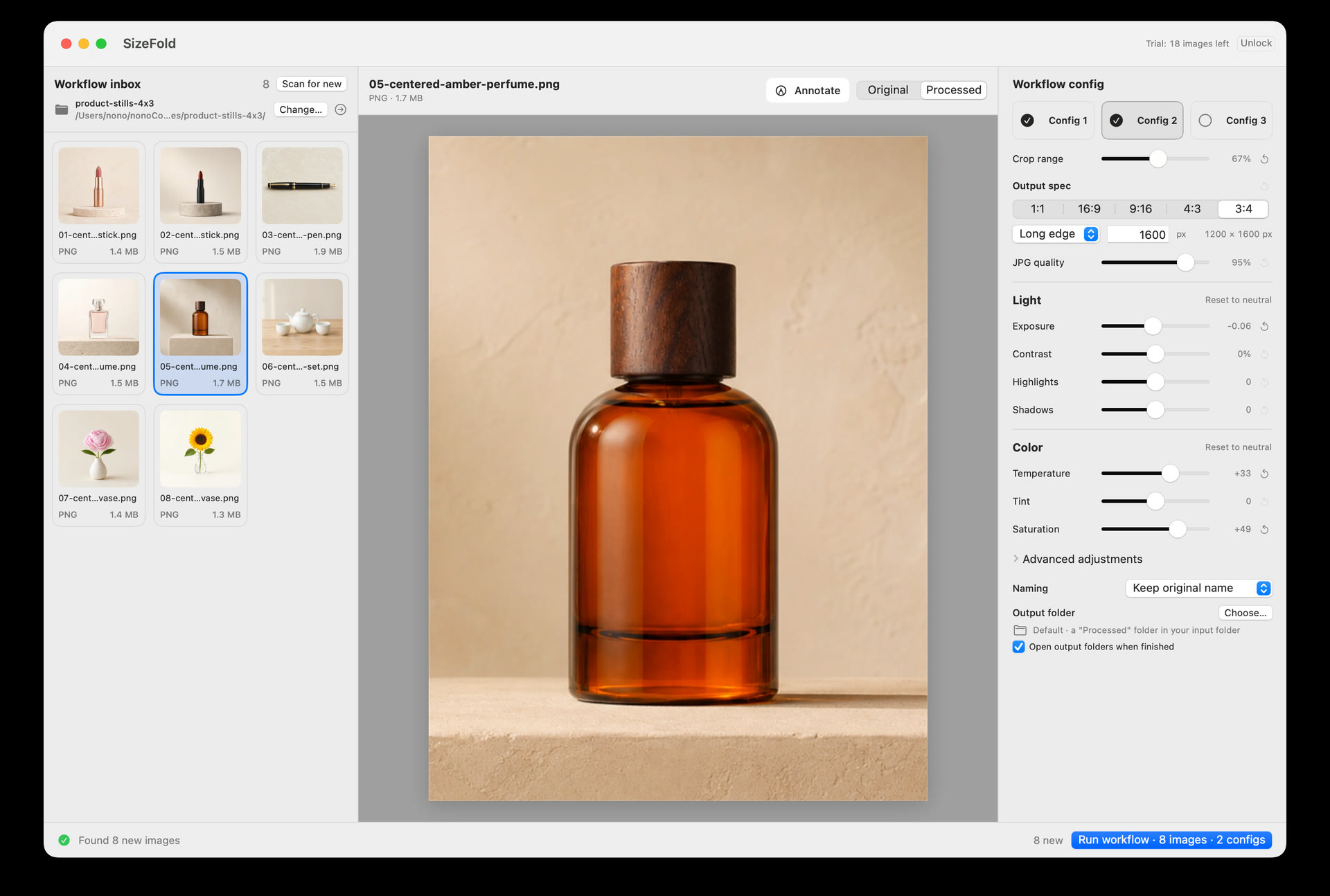
Instead of treating batch resizing as a temporary browser session, SizeFold treats your Mac folder structure as a repeatable production pipeline:
- Point SizeFold at your Input folder once: Whether photos arrive from an SD card, tethered capture, or AirDrop/LocalSend from your iPhone, top-level images in
Inputappear automatically. - Enable up to 3 output configurations: Set Config 1 to
3:4 (2000px)for Etsy, Config 2 to1:1 (2048px)for Shopify/Amazon, and Config 3 to9:16 (1920px)for social reels—each with its own target folder, naming rule, and optional Max KB limit. - Click your subject center once: Use the interactive crosshair to anchor your product's true visual center. Every enabled aspect ratio calculates its crop around that exact anchor.
- Run & auto-archive: Click Run. SizeFold renders all outputs locally on Apple Silicon, writes them to their destination folders, and moves the camera originals into
Originals/only after every enabled output is verified on disk.
Try the Native Mac Bulk Image Resizer Free
SizeFold includes 200 successfully processed source images in the free trial—with every feature unlocked. After that, it is a $19.99 one-time Mac App Store purchase with no subscription.